Unit Testing Data Pipelines
Starlake lets you unit test data pipelines locally using DuckDB, with automatic SQL transpilation from your target data warehouse dialect. No cloud access, no service accounts, and fast deterministic feedback -- ideal for CI pipelines.
Why test locally with DuckDB?
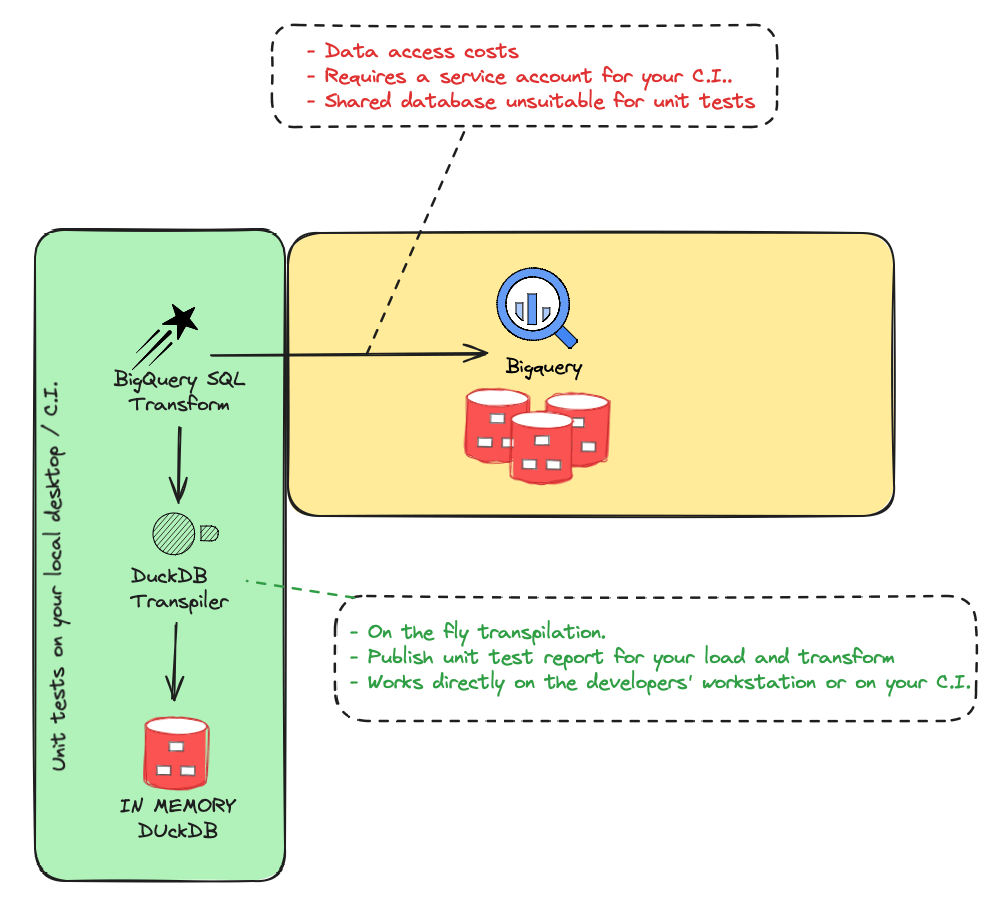
Testing data pipelines on the target data warehouse presents several challenges:
| Challenge | Cloud-based testing | Local DuckDB testing |
|---|---|---|
| Data access costs | Queries consume warehouse credits | Free, in-memory execution |
| Shared database | Unsuitable for isolated unit tests | Each test gets its own instance |
| Service accounts | Required for CI environments | Not needed |
| Feedback speed | Slow round-trips to cloud | Sub-second execution |
| Reproducibility | Hard to ensure deterministic results | Fully deterministic |
How it works
Starlake transpiles your SQL from the target dialect (BigQuery, Snowflake, Databricks, etc.) to DuckDB-compatible SQL. Tests run against a local DuckDB instance populated with sample data. Starlake compares the actual results against expected data you define in CSV or JSON files.
You write SQL in your target dialect. Starlake handles the transpilation automatically. No query modification is needed.
What you can test
Starlake supports two types of unit tests:
- Load tests -- Validate data loading pipelines. Provide sample input files and expected output data. Starlake loads the data using DuckDB and compares the result.
- Transform tests -- Validate SQL transformations. Provide source data and expected output. Starlake transpiles and runs the SQL, then compares the result.
Both types generate detailed HTML test reports with the DuckDB database, unexpected rows, and missing rows for debugging.
Running tests
Run all tests (load and transform):
starlake test
Run only load tests:
starlake test --load
Run only transform tests:
starlake test --transform
Run a specific test:
starlake test --name domain.table.test-name
Frequently Asked Questions
Why does Starlake use DuckDB for unit testing?
Starlake uses DuckDB because it is a fast, in-memory SQL database that runs locally without requiring cloud access or service accounts. This eliminates data access costs, provides fast feedback, and allows deterministic, repeatable tests.
How do Starlake unit tests work locally?
Starlake transpiles your target data warehouse SQL dialect to DuckDB-compatible SQL. This lets you run your production load and transform logic on a local DuckDB instance, comparing actual results against expected data defined in JSON files.
Can I run Starlake unit tests in my CI pipeline?
Yes, since Starlake unit tests run on DuckDB locally, they can be executed in any CI environment without needing a service account or access to the target data warehouse. This makes them ideal for automated testing before deployment.
What can I test with Starlake unit tests?
You can test both data loading and data transformations. For load tests, you provide sample input files and expected output data. For transform tests, you provide sample source data and verify the SQL transformation produces the expected results.
Does SQL transpilation change my queries?
No. You write SQL in your target dialect (BigQuery, Snowflake, Databricks, etc.) and Starlake automatically transpiles it to DuckDB for testing. Your original queries remain unchanged.
Related
- Load Tutorial -- learn how to load data before writing load tests
- Transform Tutorial -- learn how to write SQL transforms before writing transform tests
- Orchestrate Pipelines -- schedule tested pipelines with Airflow, Dagster or Snowflake Tasks