Transform Data with SQL
Starlake transforms turn raw loaded data into business insights using standard SQL SELECT statements -- no Jinja templating required. Each SQL file produces one target table, and Starlake automatically detects dependencies between tasks to run them in the correct order. This tutorial walks through creating revenue, product, and order KPI tables from the Starbake sample dataset using DuckDB. The same approach works with BigQuery, Snowflake, Databricks, and any JDBC-compatible engine.
Prerequisites
Complete the Load tutorial first to populate the database with source data.
Define the KPI Insights
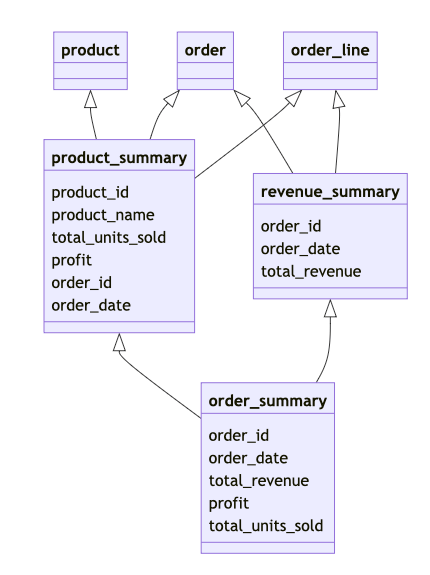
This tutorial creates three KPI tables:
- revenue_summary -- total revenue per order
- product_summary -- revenue, units sold, and profit per product and order
- order_summary -- revenue, profit, and item count per order
The execution order matters. order_summary depends on revenue_summary and product_summary, so Starlake must build those two first.
Write the SQL SELECT Statements
Store these SQL files in the kpi directory. The directory name determines the target schema: all results write to the kpi schema.
SELECT
    o.order_id,
    o.timestamp AS order_date,
    SUM(ol.quantity * ol.sale_price) AS total_revenue
FROM
    starbake.orders o
    JOIN starbake.order_lines ol ON o.order_id = ol.order_id
GROUP BY
    o.order_id, o.timestamp
SELECT
    p.product_id,
    p.name AS product_name,
    SUM(ol.quantity) AS total_units_sold,
    (SUM(ol.sale_price) - Sum(ol.quantity * p.cost)) AS profit,
    o.order_id,
    o.timestamp AS order_date
FROM
    starbake.products p
        JOIN starbake.order_lines ol ON p.product_id = ol.product_id
        JOIN starbake.orders o ON ol.order_id = o.order_id
GROUP BY
    p.product_id,
    o.order_id, p.name, o.timestamp
SELECT
    ps.order_id,
    ps.order_date,
    rs.total_revenue,
    ps.profit,
    ps.total_units_sold
FROM
    kpi.product_summary ps
        JOIN kpi.revenue_summary rs ON ps.order_id = rs.order_id
Your metadata/transform directory should look like this:
metadata/transform
└── kpi
    ├── order_summary.sql
    ├── product_summary.sql
    └── revenue_summary.sql
Check the Dependency Lineage Graph
Before running the transforms, inspect the dependency order:
starlake lineage --task kpi.order_summary --print
This produces a directed acyclic graph showing the execution order:
kpi.order_summary
  kpi.product_summary
    starbake.products
    starbake.order_lines
    starbake.orders
  kpi.revenue_summary
    starbake.orders
    starbake.order_lines
If you installed GraphViz, you can generate an SVG or PNG version:
starlake lineage --task kpi.order_summary --svg --output lineage.svg

Run the Transform with Recursive Execution
Use the --recursive flag to execute all upstream dependencies in the correct order:
starlake transform --recursive --name kpi.order_summary
Without --recursive, only the named transform runs. Use this when dependencies are already up to date.
Verify the Results
Open DuckDB and inspect the KPI tables:
$ duckdb $SL_ROOT/datasets/duckdb.db
v0.10.0 20b1486d11
Enter ".help" for usage hints.
D show;
┌──────────┬──────────┬─────────────────┬──────────────────────┬───────────────────────────────────────────────────────────────────────────────────────────────────┬───────────┐
│ database │  schema  │      name       │     column_names     │                                           column_types                                            │ temporary │
│ varchar  │ varchar  │     varchar     │      varchar[]       │                                             varchar[]                                             │  boolean  │
├──────────┼──────────┼─────────────────┼──────────────────────┼───────────────────────────────────────────────────────────────────────────────────────────────────┼───────────┤
│ duckdb   │ audit    │ audit           │ [JOBID, PATHS, DOM…  │ [VARCHAR, VARCHAR, VARCHAR, VARCHAR, BOOLEAN, BIGINT, BIGINT, BIGINT, TIMESTAMP, INTEGER, VARCH…  │ false     │
│ duckdb   │ audit    │ rejected        │ [JOBID, TIMESTAMP,…  │ [VARCHAR, TIMESTAMP, VARCHAR, VARCHAR, VARCHAR, VARCHAR]                                          │ false     │
│ duckdb   │ kpi      │ order_summary   │ [order_id, order_d…  │ [BIGINT, TIMESTAMP, DOUBLE, DOUBLE, HUGEINT]                                                      │ false     │
│ duckdb   │ kpi      │ product_summary │ [product_id, produ…  │ [BIGINT, VARCHAR, HUGEINT, DOUBLE, BIGINT, TIMESTAMP]                                             │ false     │
│ duckdb   │ kpi      │ revenue_summary │ [order_id, order_d…  │ [BIGINT, TIMESTAMP, DOUBLE]                                                                       │ false     │
│ duckdb   │ starbake │ order           │ [customer_id, orde…  │ [BIGINT, BIGINT, VARCHAR, TIMESTAMP]                                                              │ false     │
│ duckdb   │ starbake │ order_line      │ [order_id, product…  │ [BIGINT, BIGINT, BIGINT, DOUBLE]                                                                  │ false     │
│ duckdb   │ starbake │ product         │ [category, cost, d…  │ [VARCHAR, DOUBLE, VARCHAR, VARCHAR, DOUBLE, BIGINT]                                               │ false     │
└──────────┴──────────┴─────────────────┴──────────────────────┴───────────────────────────────────────────────────────────────────────────────────────────────────┴───────────┘
D select * from kpi.order_summary limit 5;
┌──────────┬─────────────────────────┬────────────────────┬─────────────────────┬──────────────────┐
│ order_id │       order_date        │   total_revenue    │       profit        │ total_units_sold │
│  int64   │        timestamp        │       double       │       double        │      int128      │
├──────────┼─────────────────────────┼────────────────────┼─────────────────────┼──────────────────┤
│       24 │ 2024-02-13 07:03:35.94  │           11708.55 │             7609.14 │              405 │
│       27 │ 2024-02-26 01:12:45.282 │            2430.00 │              850.50 │              162 │
│       44 │ 2024-03-01 04:48:42.158 │            2109.24 │             1090.26 │              243 │
│       46 │ 2024-02-10 18:27:05.732 │            3645.00 │             1883.25 │              243 │
│       56 │ 2024-01-30 07:33:08.621 │            6075.00 │             3948.75 │              405 │
└──────────┴─────────────────────────┴────────────────────┴─────────────────────┴──────────────────┘
D .quit
The KPI tables are now in the kpi schema. You can schedule these transforms with an orchestrator -- see Orchestrate Transform Jobs for details.
Next Steps
- Customize Transform Configuration -- set write strategies, partitioning, and access control
- SQL Transform Syntax -- learn about incremental models, column documentation, and custom SQL
- Export Transform Results -- write results to CSV, Parquet, or another database
- Generate and Deploy DAGs -- schedule your transforms with Airflow, Dagster or Snowflake Tasks
- Unit Test Transforms -- validate SQL transformations locally on DuckDB
Frequently Asked Questions
What is the difference between starlake transform and starlake load?
starlake load ingests raw files (CSV, JSON, Parquet) into the data warehouse. starlake transform executes SQL SELECT statements to create new derived tables from the loaded data.
Does Starlake require Jinja templating in SQL files?
No. Starlake transformations use standard SQL without Jinja templating. Environment variables like sl_start_date and sl_end_date are injected automatically.
How does Starlake determine the execution order of transforms?
Starlake analyzes the FROM and JOIN clauses in each SQL file to build a dependency graph (DAG). The starlake lineage command visualizes this graph.
Can you run a single transform without its dependencies?
Yes. Without the --recursive flag, only the named transform runs. The --recursive flag forces execution of all upstream dependencies first.
Where are transform results stored?
The subdirectory name inside metadata/transform/ determines the target schema. For example, files in metadata/transform/kpi/ write to the kpi schema.
Does Starlake work with DuckDB for SQL transformations?
Yes. This tutorial uses DuckDB as the local engine. Starlake also supports BigQuery, Snowflake, Databricks, and any JDBC-compatible engine.
How do you visualize the lineage graph as SVG?
Install GraphViz, then run starlake lineage --task kpi.order_summary --svg --output lineage.svg.